
Card Issuance
Unified Cards is a centralized system that simplifies how you issue and manage payment cards. It provides a centralized way to Issue Cards through a single integration point. These are card that allows customers to make purchases by directly withdrawing funds from their Passport account. Each card is linked to a single active account within the Passport system.
Supported Card Types
The Unified Card API is designed to support diverse business use cases by offering flexibility in both how capital is accessed (Financial Models) and how the card is available to you.
- Debit Cards (Account-Linked): These cards provide instant liquidity by linking directly to the cardholder's active Passport account. Transactions are authorized in real-time against the core account's available balance, making them ideal for standard operational spending or consumer banking.
- Prepaid Cards (Pre-Funded): Designed specifically for expense management. Instead of accessing the main account balance, they must be pre-funded with a specific allowance ensuring the user can never exceed their allocated budget. (Note: Restricted to Business Customers only).
Once the type of card model is selected, you can chose what kind of card is required and how these cards are available to you. You can reach out to Account Management team to define the Card Program for you.
| Card Type | Description | Use Case |
|---|---|---|
| Physical Card | A tangible card shipped to the customer, designed for in-person transactions and ATM withdrawals. | Ideal for everyday retail purchases, ATM cash withdrawals, and customers who prefer carrying a physical card for offline usage. |
| Digital Card | A fully virtual card issued instantly and accessible online or via mobile wallets. Supports Push Provisioning, allowing customers to add the card directly to Apple Pay or Google Pay from your app for secure, contactless payments. | Best suited for online purchases, subscription payments, mobile wallet transactions, and users who need immediate access or multiple cards for expense separation. |
| Digital-First Card | A hybrid model where a digital card is activated immediately while the physical card is printed and shipped. Also supports Push Provisioning for instant addition to Apple Pay or Google Pay. | Suitable for users who need immediate online or mobile wallet access while waiting for their physical card for in-store and ATM use. |
All Digital and Digital-First cards come equipped with Mobile Wallet capabilities ie Push Provisioning. This allows your customers to instantly add their cards to Apple Pay or Google Paydirectly from your app for secure, contactless in-store payments. We will learn more about this in the next sections.
Get started with Issuing
Complete the following steps to set up a card program and issue cards:
- Request feature enablement: Contact your Account Manager to Enable the Unified Card Issuance feature for your Program Manager.
- Set up a Card Program: Configure your master template (Card Program) with the Account Management team to define business rules, spending limits, and KYC requirements at the program level.
- Choose your Card Holder: Choose what type of Card Holder requires the Card. Also, ensure the intended cardholder has an ACTIVE Passport account and has successfully passed Customer Identification Program (CIP) checks.
- Choose your card type: Decide whether to issue Physical, Digital, or hybrid Digital-First cards.
- Issue cards: Use the Unified API to Issue a Debit or Prepaid card linked to the customer's Passport account.
- Fund your cards: Ensure the linked Passport account has sufficient funds (for Debit) or load funds from the master Passport account (for Prepaid). Lean more about adding funds to your card.
- Set Spending Limits: You can setup custom spending limits for your card specific high-value users.
- Manage your cards: Once a card is active, you have full control over its usage. You can perform real-time actions like Freezing a misplaced card, replacing a lost one. Learn more about Card Management.
Card Lifecycle
The CARD lifecycle defines a card's journey from initiation to activation to termination. Each status serves a critical role in maintaining the security of the funds and the usability of the card. By transitioning through these states, the system ensures that cards are only usable when in the hands of the verified owner and provides mechanisms to mitigate risk in case of loss or theft.
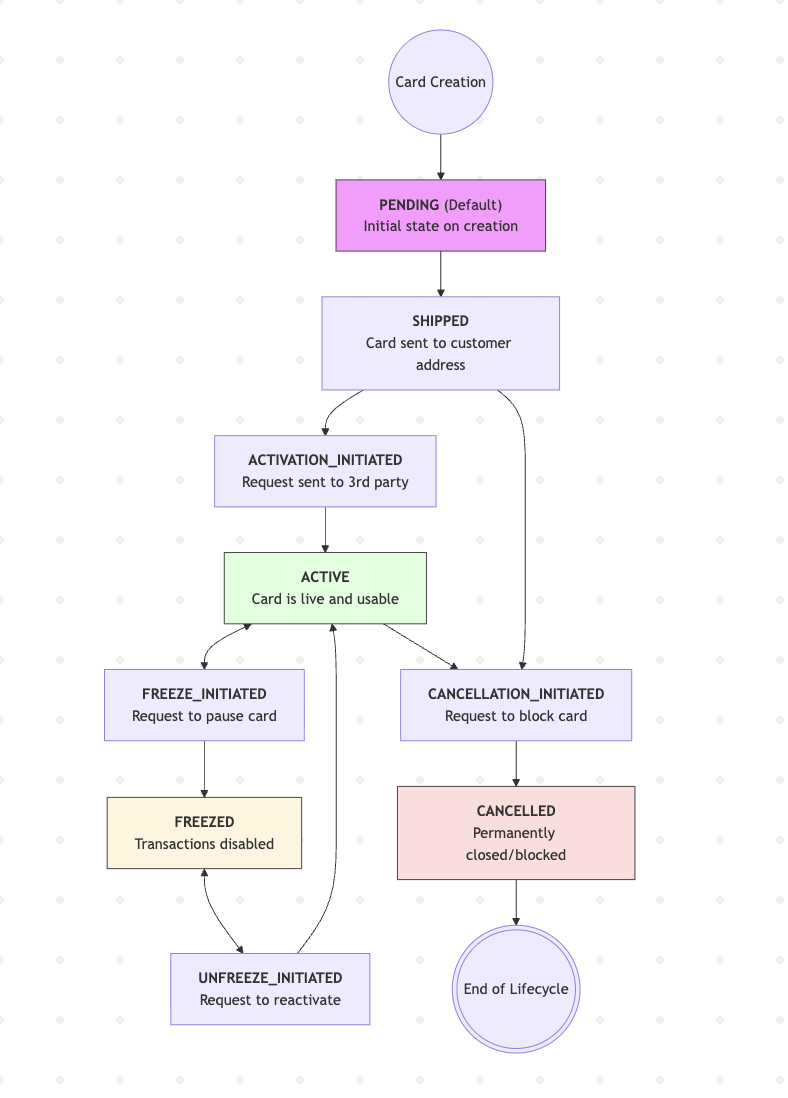
Issuance PENDING → SHIPPED
The card is created and enters the inactive physical lifecycle.
Activation: SHIPPED → ACTIVE
Proceeds through ACTIVATION_INITIATED to enable transactions.
Maintenance: ACTIVE ↔ FREEZED
A temporary state managed via FREEZE_INITIATED and UNFREEZE_INITIATED.
Termination: ACTIVE → CANCELLED
A permanent state. After CANCELLATION_INITIATED, the card is fully blocked.
| Phase | Status | Description |
|---|---|---|
| Issuance & Activation | PENDING | Card is created in the system but remains inactive. |
| Issuance & Activation | SHIPPED | Physical card is in transit and cannot be used, preventing fraud if intercepted. |
| Issuance & Activation | ACTIVATION_INITIATED | Transition state triggered when the customer begins activation. |
| Issuance & Activation | ACTIVE | Card is fully functional for all transaction types (POS, ATM, Online). |
| Security & Temporary Suspension | FREEZE_INITIATED / FREEZED | Card is temporarily paused; all transactions are declined. |
| Security & Temporary Suspension | UNFREEZE_INITIATED | Request to restore the card to ACTIVE status without changing details. |
| Terminal States | CANCELLATION_INITIATED | System is processing a request to permanently shut down the card. |
| Terminal States | CANCELLED (Blocked) | Terminal state; card is permanently deactivated and cannot be reactivated. |
Updated about 11 hours ago