
Unified Cards
Unified Cards is a centralized system that simplifies how you issue and manage payment cards. It provides a centralized way to issue Debit and Prepaid cards through a single integration point. These are card that allows customers to make purchases by directly withdrawing funds from their Passport account. Each card is linked to a single active account within the Passport system.
Supported Card Types
The Unified API supports issuing various card form factors to suit different customer needs:
- Physical Debit Cards: Ideal for in-person transactions and ATM withdrawals. These cards offer broad acceptance across offline merchants and are preferred by users who value a tangible card for daily use and easy cash access. Only one physical debit card can be issued per account per card program.
- Digital Debit Cards: Fully virtual and instantly available, these are optimized for online purchases and mobile wallet payments. They are highly secure and designed for users who prioritize convenience and immediate access. Multiple digital cards can be issued to the same user for different purposes (e.g., separating personal and business expenses).
- Digital-First Debit Cards: A hybrid model where a digital version is active immediately after issuance, allowing online transactions while the physical card is being printed and shipped. This offers the speed of digital onboarding with the flexibility of a physical card.
All Digital and Digital-First cards come equipped with Mobile Wallet capabilities ie Push Provisioning. This allows your customers to instantly add their cards to Apple Pay or Google Paydirectly from your app for secure, contactless in-store payments. We will learn more about this in the next sections.
How Unified Cards work
The Unified Card issuance process is designed to be simple and centralized. It moves you from defining rules once to issuing cards instantly for any customer type.
- Define Your Card Program: Instead of setting rules for every individual account, you configure combined rules (spend limits, allowed merchants, and compliance checks) just once at the program level. This serves as the blueprint for all your cards.
- Issue Instantly: You send a single API request to issue a card. Whether it is for a Business or an Individual, the system automatically detects the customer type, applies the Rules, and generates the Debit or Prepaid card immediately.
- Manage the Lifecycle: Once a card is active, you have full control over its usage. You can perform real-time actions like Freezing a misplaced card, replacing a lost one, or setting custom Spend Limits for specific high-value users.
Card Lifecycle
The CARD lifecycle defines a card's journey from initiation to activation to termination. Each status serves a critical role in maintaining the security of the funds and the usability of the card. By transitioning through these states, the system ensures that cards are only usable when in the hands of the verified owner and provides mechanisms to mitigate risk in case of loss or theft.
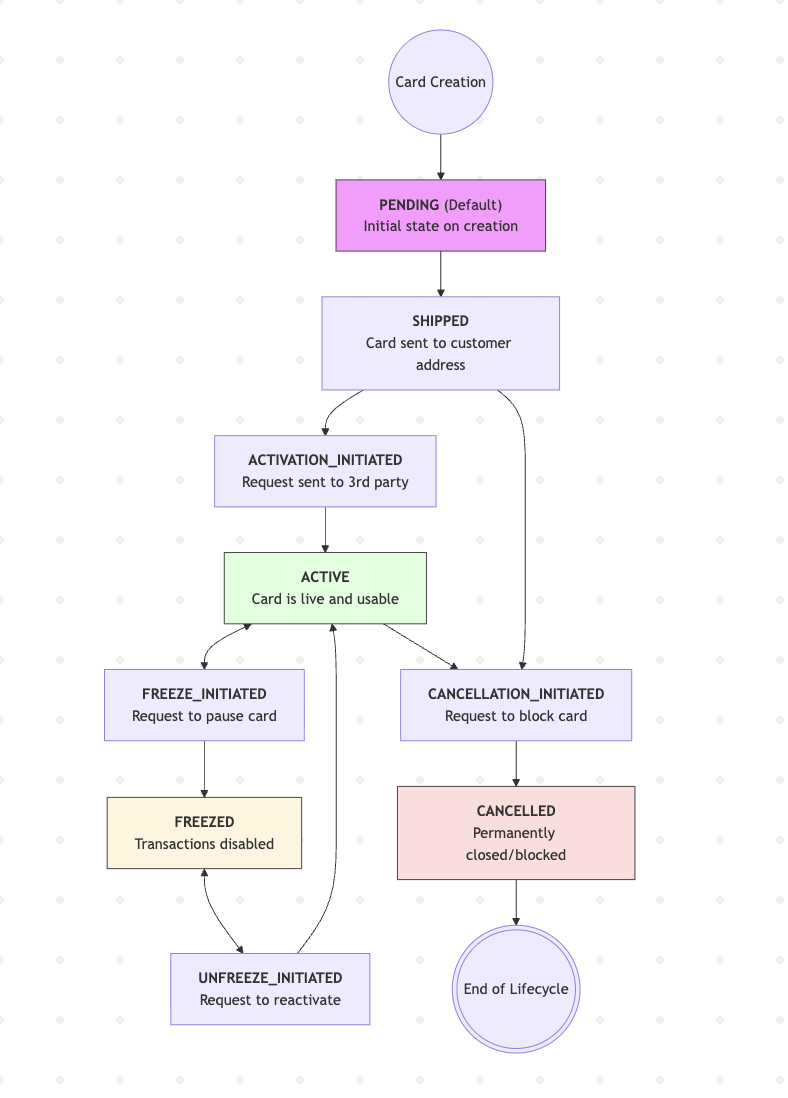
Issuance PENDING → SHIPPED
The card is created and enters the inactive physical lifecycle.
Activation: SHIPPED → ACTIVE
Proceeds through ACTIVATION_INITIATED to enable transactions.
Maintenance: ACTIVE ↔ FREEZED
A temporary state managed via FREEZE_INITIATED and UNFREEZE_INITIATED.
Termination: ACTIVE → CANCELLED
A permanent state. After CANCELLATION_INITIATED, the card is fully blocked.
Issuance & Activation
Before a card is usable, it undergoes a secure onboarding process:
- PENDING (Default): The card is created in the system but remains inactive.
- SHIPPED: The physical card is in transit. It cannot be used for transactions, preventing fraud if the card is intercepted in the mail.
- ACTIVATION_INITIATED: A transition state triggered when the customer begins activation. ACTIVE: The card is fully functional for all transaction types (POS, ATM, Online).
Security & Temporary Suspension
Users can manage their card's availability through the management features:
- FREEZE_INITIATED / FREEZED: The card is temporarily "paused." All transactions will be declined. This is ideal for misplaced cards or security precautions.
- UNFREEZE_INITIATED: The request to move the card back to an ACTIVE state, restoring full utility without changing card details.
Terminal States
Once a card is no longer required or has been compromised, it enters the final phase:
- CANCELLATION_INITIATED: The system is processing a request to permanently shut down the card.
- CANCELLED (Blocked): The terminal state. The card is securely and permanently deactivated. This action cannot be undone; if a user requires a card again, a new one must be issued.
Updated 4 days ago