
Manage your Cards
Take real-time control of issued cards — pause usage, handle risk, or permanently close and replace cards when needed.
All management actions are status-driven and apply to both Debit and Prepaid cards, based on your Card Program configuration.
Choose an Action
| Action | When to Use | Result |
|---|---|---|
| Freeze | Card is temporarily at risk or misplaced | Transactions blocked temporarily |
| Unfreeze | Card is verified and safe | Transactions resume |
| Cancel | Card is permanently compromised or no longer needed | Card permanently disabled |
| Replace | Card is lost, stolen, damaged or not delivered | Old card blocked, new card issued |
Card Lifecycle
Every card moves through controlled states from creation to termination. These transitions ensure that cards are only usable when valid, and restricted immediately when risk is detected.
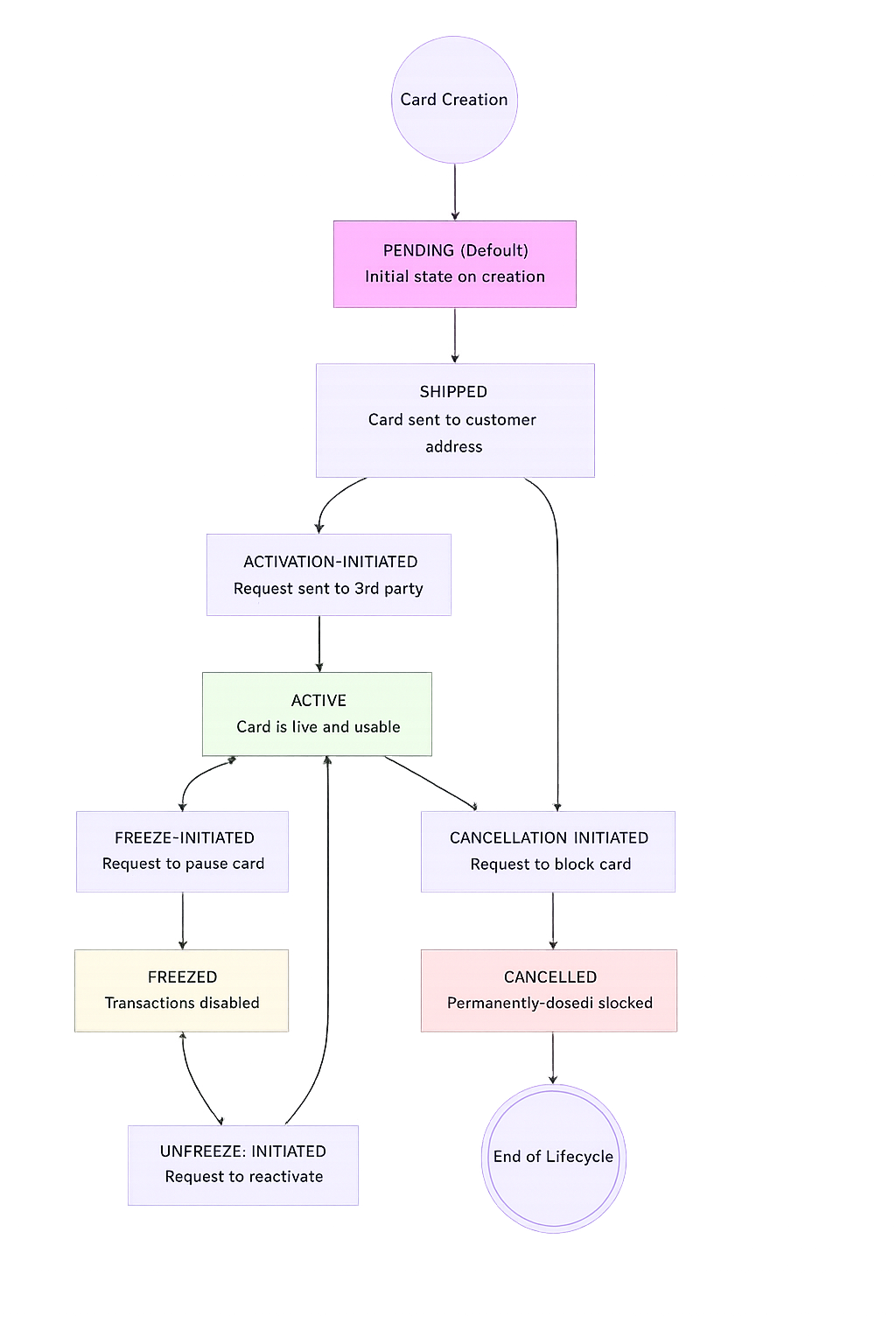
Lifecycle Phases
Note: The
SHIPPEDstate applies only to cards with physical issuance. Digital-only cards skip this step and move directly to activation.
Phase | Transition | Description |
|---|---|---|
Issuance |
| Card is created and delivered (if it supports physical properties) |
Activation | Activation based on card type:
| Card becomes usable |
Freeze / Unfreeze |
| Temporary restriction and recovery |
Termination |
| Permanent closure |
All Supported Statuses
| Status | Description |
|---|---|
PENDING | Card is created but inactive |
SHIPPED | Physical card is in transit |
ACTIVATION_INITIATED | Activation request in progress |
ACTIVE | Card is live and usable |
FREEZE_INITIATED | Freeze request in progress |
FREEZED | Card is temporarily blocked |
UNFREEZE_INITIATED | Unfreeze request in progress |
CANCELLATION_INITIATED | Cancellation request in progress |
CANCELLED | Card permanently blocked |
Cards can perform transactions only in
ACTIVEstate.
Manage Card State
All actions below operate within the lifecycle defined above.
How to Think About These Actions:
- Freeze → temporary control (reversible)
- Cancel → permanent closure (irreversible)
- Replace → secure reissuance (old blocked + new issued)
All of these actions operate within the constraints defined by your Card Program and are validated against the card’s current state. Each request is checked to ensure the transition is allowed, and any attempt to perform an invalid state change will be rejected by the system.
1. Freeze or Unfreeze a Card
Temporarily pause or resume card usage without changing card details.
- Freeze a card to block all transactions → POST
/v1/customer/id/{customer_id}/issuance/card/id/{card_id}/freeze - Unfreeze a card to restore usage → POST
/v1/customer/id/{customer_id}/issuance/card/id/{card_id}/unfreeze
Use following key parameters for these APIs:
| Field | Required | Description |
|---|---|---|
reason | ✓ | Reason for freezing |
freezeTill | ✓ | Duration until auto-unfreeze |
Behavior
- After freeze, card transitions:
ACTIVE→FREEZE_INITIATED→FREEZED - All transactions are declined while frozen
- Unfreeze restores:
FREEZED→UNFREEZE_INITIATED→ACTIVE
2. Cancel a Card
Use the POST /v1/customer/id/{customer_id}/issuance/card/id/{card_id}/cancel API to permanently deactivate a card. This action cannot be reversed.
Use when:
- Card is permanently compromised
- User is offboarded
- Card is no longer required
Behavior
- Card Transition:
ACTIVE→CANCELLATION_INITIATED→CANCELLED - Card cannot be reactivated.
- For prepaid cards, ensure balance is unloaded before cancellation.
3. Replace a Card
Use the POST /v1/customer/id/{customer_id}/issuance/card/id/{card_id}/replace API to replace an existing card with a new one for the same cardholder.
Use this action when your card is lost, stolen, or damaged.
What happens:
- Existing card is blocked.
- New card is issued with new card number, CVV and expiry date.
- New card follows standard lifecycle.