
Manage your Cards
Take real-time control of issued cards: pause usage, handle risk, or permanently close and replace cards when needed.
All management actions are status-driven and apply to both Debit and Prepaid cards, based on your Card Program configuration.
Choose an action
| Action | When to Use | Result |
|---|---|---|
| Freeze | Card is temporarily at risk or misplaced | Transactions blocked temporarily |
| Unfreeze | Card is verified and safe | Transactions resume |
| Cancel | Card is permanently compromised or no longer needed | Card permanently disabled |
| Replace | Card is lost, stolen, damaged or not delivered | Old card blocked, new card issued |
Card lifecycle
Every card moves through controlled states from creation to termination. These transitions ensure that cards are only usable when valid, and restricted immediately when risk is detected.
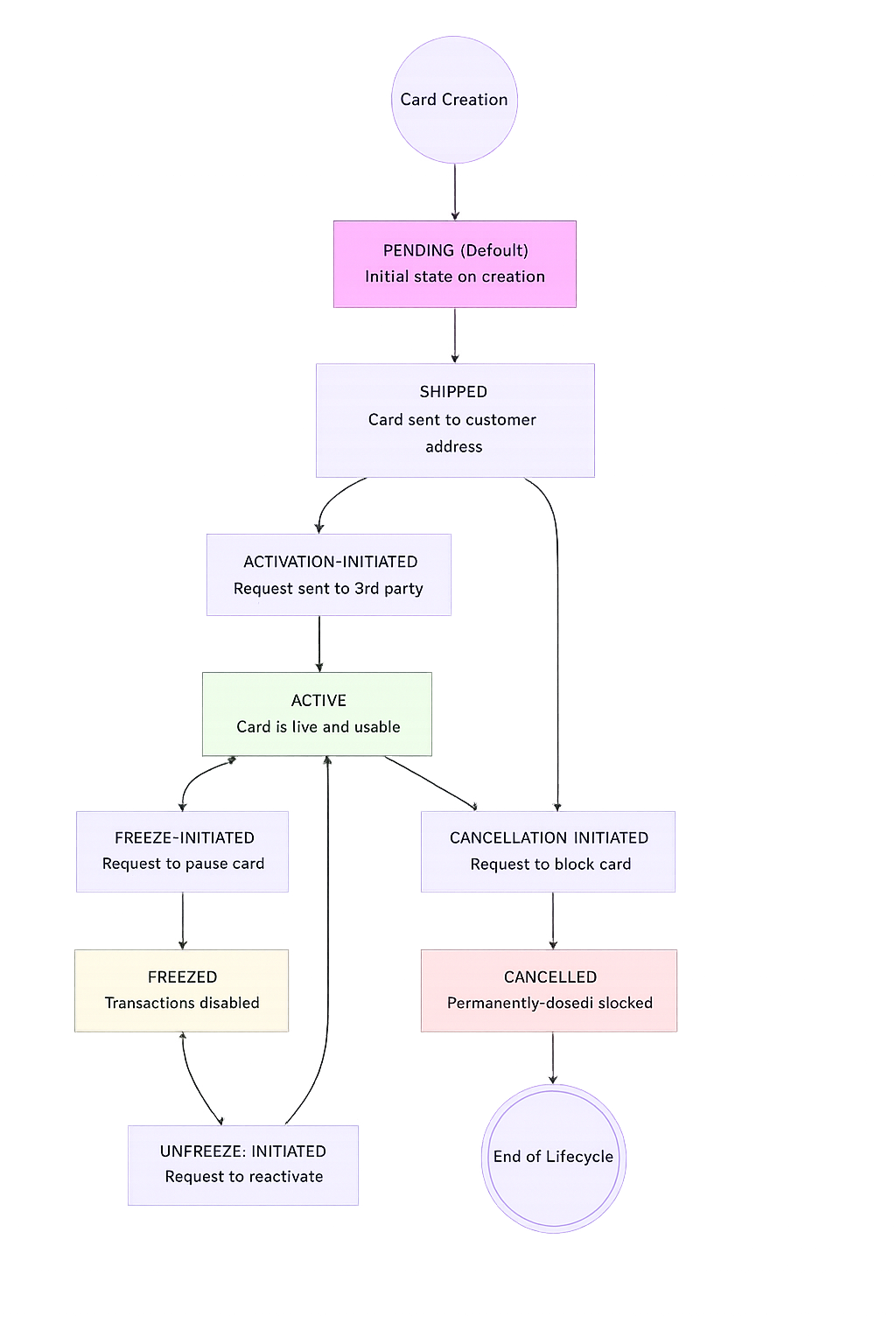
Lifecycle phases
Note: The
SHIPPEDstate applies only to cards with physical issuance. Digital-only cards skip this step and move directly to activation.
| Phase | Transition | Description |
|---|---|---|
| Issuance | PENDING | Card is created and delivered (if it supports physical properties) |
| Activation | Activation based on card type:
| Card becomes usable |
| Freeze / Unfreeze | ACTIVE → FREEZE_INITIATED → FREEZED → UNFREEZE_INITIATED → ACTIVE | Temporary restriction and recovery |
| Termination | ACTIVE → CANCELLATION_INITIATED → CANCELLED | Permanent closure |
All supported statuses
| Status | Description |
|---|---|
PENDING | Card is created but inactive |
SHIPPED | Physical card is in transit |
ACTIVATION_INITIATED | Activation request in progress |
ACTIVE | Card is live and usable |
FREEZE_INITIATED | Freeze request in progress |
FREEZED | Card is temporarily blocked |
UNFREEZE_INITIATED | Unfreeze request in progress |
CANCELLATION_INITIATED | Cancellation request in progress |
CANCELLED | Card permanently blocked |
Cards can perform transactions only in
ACTIVEstate.
Scenarios
All card management actions follow the same lifecycle: request, validate, initiate, network update, confirmation. The only difference is the action type and the resulting state transition.
sequenceDiagram
    participant User as Cardholder
    participant App as Your Application
    participant PCE as PCE
    participant Network as Card Network

    User->>App: Request card action (freeze/unfreeze/cancel/replace)
    App->>PCE: POST /card/{id}/{action}
    PCE->>PCE: Validate card state
    PCE-->>App: 200 (status *_INITIATED)
    PCE->>Network: Send card status update
    Network-->>PCE: Confirmation
    PCE-->>App: Webhook (status updated)
    App->>User: Confirmation message
Before you begin (all scenarios)
- Card is in a valid state for the requested action.
- Customer is
ACTIVE. - Cardholder identity has been verified.
Scenario 1: Freeze a card temporarily
Use this scenario when a cardholder reports a card as misplaced or you detect suspicious activity. Freezing temporarily blocks all transactions while keeping the card active for later reuse.
Business Context: A cardholder calls customer support saying they can't find their debit card. Rather than immediately canceling (which requires issuing a replacement), the support agent freezes the card for 48 hours while the customer searches. If found, it can be unfrozen instantly.
You'll also need: Card is in ACTIVE status, cardholder has verified their identity.
Request
POST /v1/customer/id/48201/issuance/card/id/55903/freeze
Content-Type: application/json
x-api-key: YOUR_API_KEY

{
  "reason": "LOST",
  "freezeTill": "2026-07-11T23:59:59Z"
}
The card transitions ACTIVE → FREEZE_INITIATED → FREEZED. All transactions are declined while frozen.
Scenario 2: Unfreeze a card
Use this scenario when a frozen card has been verified as safe and the cardholder wants to resume using it.
You'll also need: Card is in FREEZED status, the freeze reason has been resolved.
Request
POST /v1/customer/id/{customerId}/issuance/card/id/{cardId}/unfreeze
Content-Type: application/json
x-api-key: YOUR_API_KEY

{
  "reason": "Card verified as safe"
}
The card transitions FREEZED → UNFREEZE_INITIATED → ACTIVE. Transactions resume immediately.
Scenario 3: Cancel a card permanently
Use this scenario when a card is permanently compromised, the cardholder is offboarded, or the card is no longer needed. This action is irreversible.
Business Context: A cardholder confirms their wallet was stolen. The card must be permanently cancelled to prevent any future risk.
You'll also need: Card is in ACTIVE or FREEZED status. For prepaid cards, unload remaining balance first.
Irreversible Action: Once cancelled, a card cannot be reactivated. The card is added to the network's hot card file.
Request
POST /v1/customer/id/48201/issuance/card/id/55903/cancel
Content-Type: application/json
x-api-key: YOUR_API_KEY

{
  "reason": "STOLEN"
}
The card transitions ACTIVE → CANCELLATION_INITIATED → CANCELLED.
Scenario 4: Replace a lost or damaged card
Use this scenario when a card is lost, stolen, damaged, or not delivered. The existing card is blocked and a new card is issued with new credentials.
Business Context: A cardholder's physical card was damaged. They need a replacement card shipped to their home address.
You'll also need: Card is in ACTIVE, FREEZED, or SHIPPED status. Shipping address is on file.
Request
POST /v1/customer/id/48201/issuance/card/id/55903/replace
Content-Type: application/json
x-api-key: YOUR_API_KEY

{
  "reason": "DAMAGED",
  "shippingDetail": {
    "address": {
      "id": 1045579
    },
    "expressDelivery": "true"
  }
}
The old card is blocked, and a new card is issued with new card number, CVV, and expiry date. For digital-first cards, the cardholder can add the replacement to Apple Pay or Google Pay immediately.
Manage card state
All actions below operate within the lifecycle defined above.
How to Think About These Actions:
- Freeze → temporary control (reversible)
- Cancel → permanent closure (irreversible)
- Replace → secure reissuance (old blocked + new issued)
All of these actions operate within the constraints defined by your Card Program and are validated against the card’s current state. Each request is checked to ensure the transition is allowed, and any attempt to perform an invalid state change will be rejected by the system.
1. Freeze or unfreeze a card
Temporarily pause or resume card usage without changing card details.
- Freeze a card to block all transactions → POST
/v1/customer/id/{customer_id}/issuance/card/id/{card_id}/freeze - Unfreeze a card to restore usage → POST
/v1/customer/id/{customer_id}/issuance/card/id/{card_id}/unfreeze
Use following key parameters for these APIs:
| Field | Required | Description |
|---|---|---|
reason | ✓ | Reason for freezing |
freezeTill | ✓ | Duration until auto-unfreeze |
Behavior
- After freeze, card transitions:
ACTIVE→FREEZE_INITIATED→FREEZED - All transactions are declined while frozen
- Unfreeze restores:
FREEZED→UNFREEZE_INITIATED→ACTIVE
2. Cancel a card
Use the POST /v1/customer/id/{customer_id}/issuance/card/id/{card_id}/cancel API to permanently deactivate a card. This action cannot be reversed.
Use when:
- Card is permanently compromised
- User is offboarded
- Card is no longer required
Behavior
- Card Transition:
ACTIVE→CANCELLATION_INITIATED→CANCELLED - Card cannot be reactivated.
- For prepaid cards, ensure balance is unloaded before cancellation.
3. Replace a card
Use the POST /v1/customer/id/{customer_id}/issuance/card/id/{card_id}/replace API to replace an existing card with a new one for the same cardholder.
Use this action when your card is lost, stolen, or damaged.
What happens:
- Existing card is blocked.
- New card is issued with new card number, CVV and expiry date.
- New card follows standard lifecycle.
Next steps
See also
- Issuing a Card: issue a new or replacement card
- Digital wallets with Issuing: re-provision wallets after a replace
Updated 25 days ago